

Prep Data for AI: How to Get Your Power BI Semantic Model Genuinely Copilot-Ready
- madhupandit

- May 6
- 6 min read
Updated: May 19

In our previous two posts, we covered the retirement of Power BI Q&A visuals and Q&A Setup in December 2026, and why Copilot is not a straightforward drop-in replacement for most enterprise environments. In this post, we go one level deeper, into the specific framework Microsoft has introduced to help organisations prepare their Power BI semantic models for AI-powered natural language querying.
That framework is called Prep Data for AI. It is not widely known outside the Power BI technical community, but it is arguably the most important concept for any enterprise team planning a Copilot rollout.
Other posts in this series:


What Is Prep Data for AI for Power BI?
Prep Data for AI is Microsoft's framework for structuring Power BI semantic models so that Copilot, and other AI tools operating against your data, can interpret and query them accurately.
It is not a single button or setting. It is a set of practices and configurations that report authors and BI leads apply to their semantic models before enabling Copilot. Think of it as the preparation work that happens before you hand the keys to an AI, ensuring that what the AI finds when it looks at your data is structured, labelled, and described in a way it can reliably work with.
The framework sits in Power BI Desktop and the Power BI Service, and covers several distinct areas. Each one addresses a different way that a poorly structured model can undermine Copilot's accuracy.
What Licences Do You Actually Need to Enable Prep Data for AI?
Before your team can configure Prep Data for AI and enable Copilot, the licensing needs to be in place. This is where many organisations get caught out.


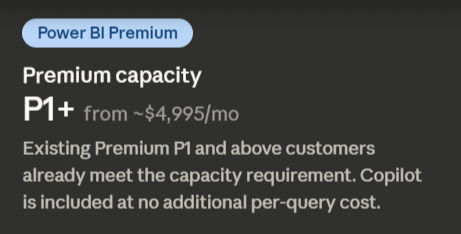
Power BI Pro or Premium Per User (PPU) licence alone is not sufficient. Copilot requires organisational capacity. Specifically, your organisation needs a paid Fabric capacity at F2 or higher, starting at approximately $262 per month, or Power BI Premium capacity at P1 or higher. Copilot is included in all paid Fabric SKUs at no additional cost, there is no separate Copilot licence to purchase.
Copilot is not a per-user add-on. It requires organisational capacity infrastructure, a paid Fabric or Premium capacity assigned to the workspace where your reports live. Individual licences alone will never unlock it.

The F2 minimum was lowered from F64 in April 2025, making Copilot accessible to mid-market organisations for the first time. This is a significant change that removes what was previously a very high cost barrier to entry.


Copilot does not come with a separate per-query charge. Usage counts against your existing Fabric capacity units (CUs). A Fabric admin must enable Copilot at the tenant level before it becomes available.
The practical implication: if your organisation is currently on standalone Pro licences without capacity, enabling Copilot, and therefore Prep Data for AI, requires a procurement decision before any technical preparation can begin. That conversation is worth having now, not in October 2026.
What Prep Data for AI Actually Covers
Measure and field descriptions
Copilot reads the descriptions attached to measures and columns in your semantic model to understand what each one represents. If your measures have no descriptions, which is the case in the majority of enterprise Power BI environments, Copilot is essentially guessing based on the field name alone. Prep Data for AI requires meaningful, plain-English descriptions on every measure and column that users are likely to query. This is the single highest-impact change most teams can make.
Synonyms
Like Q&A Setup before it, Prep Data for AI allows you to define synonyms so that Copilot understands that "revenue," "turnover," and "income" all refer to the same measure. The difference is that in Prep Data for AI, synonyms are defined at the model level rather than in a separate linguistic layer, making them more robust and more portable. If your organisation uses specific internal terminology that does not match standard business language, this configuration is essential.
Discouraging irrelevant fields
Not every column in a semantic model is relevant to natural language queries. Technical keys, internal identifiers, staging columns, and system fields should be hidden from Copilot's view, otherwise it may surface them in response to queries, producing confusing or misleading results. Prep Data for AI includes the ability to mark fields as not intended for AI interaction, keeping Copilot focused on what matters to business users.
Measure organisation and clarity
Copilot navigates your model by understanding the relationship between measures: what they calculate, what they depend on, and what questions they are designed to answer. Models where measures are disorganised, duplicated, or inconsistently named make this navigation unreliable. Prep Data for AI encourages a structured approach to measure design that makes the model's logic transparent to both humans and AI.
Table and relationship clarity
Copilot needs to understand how your tables relate to each other in order to answer questions that span multiple data domains, for example, combining finance data with headcount data to answer a question about cost per employee. Ambiguous or poorly documented relationships in the model produce ambiguous answers. Prep Data for AI addresses this by ensuring relationships are clearly defined and that the model's structure is comprehensible without specialist knowledge.
Why Most Enterprise Models Are Not Ready
The honest assessment for most enterprise Power BI environments is that Prep Data for AI reveals a significant backlog of remediation work.
The majority of enterprise semantic models were built incrementally: measures added as reporting requirements grew, columns retained because removing them felt risky, naming conventions that made sense to the analyst who wrote them but no one else. Descriptions were rarely written because Q&A Setup provided a compensating layer. Synonyms were managed separately and never embedded in the model. Fields were never hidden because there was no pressing reason to do so.
None of this was negligent. It was rational given the tools and incentives at the time. But it means that the average enterprise Power BI model, if you were to enable Copilot on it today, would produce unreliable results, not because Copilot is a poor tool, but because the model was never built with AI in mind.
Prep Data for AI is the framework for closing that gap. But closing it requires a systematic review of the semantic model, not a quick fix.
How to Approach the Prep Data for AI Process
The most effective way to approach Prep Data for AI is as a structured audit followed by a phased remediation, not as a one-time task to be completed before a deadline.
Start by identifying your most used and most business-critical semantic models. These are the ones where Copilot adoption will have the highest impact and where inaccurate results would cause the most damage. Prioritise these for remediation first.
For each model, work through the Prep Data for AI checklist systematically: descriptions on all relevant measures and columns, synonyms for key business terminology, hidden fields for technical and system columns, and a review of measure naming and organisation for consistency and clarity.
Document as you go. The process of writing descriptions and synonyms surfaces ambiguities in how data is defined across the organisation, and those ambiguities often reveal broader data governance issues that need addressing regardless of Copilot.
Once a model has been through this process, validate it by testing Copilot against a representative set of business questions. Does it return the right measure when asked for "total revenue last quarter"? Does it understand the difference between "headcount" and "FTE"? Does it handle cross-domain questions correctly? The answers tell you whether the remediation was thorough enough.
The Connection to Your Copilot Readiness Timeline
The December 2026 Q&A retirement deadline is a forcing function. But the Prep Data for AI process is not something that should be compressed into the final weeks before the deadline. Done properly, for a complex enterprise model, it takes time: time to document, time to test, time to iterate.
Organisations that start this process now have the luxury of doing it properly. Organisations that leave it until late 2026 will be making compromises under pressure, and a poorly prepared model will undermine Copilot's performance regardless of how much has been invested in licensing and capacity.
The three elements: Q&A visual migration, Q&A Setup retirement, and Prep Data for AI, are not separate problems. They are three dimensions of a single transition, and they need to be addressed together as part of a coordinated Copilot readiness programme.
Bringing It Together
Across this series, we have covered why the Q&A retirement is more consequential than it first appears, what enterprise teams stand to lose beyond the Q&A visual itself, and what Microsoft's Prep Data for AI framework requires in practice.
The common thread is preparation. Copilot is a capable tool, but it is entirely dependent on the quality and structure of the data environment beneath it. The organisations that will get genuine value from Copilot are the ones that treat the transition as a data quality and governance initiative, not a licence purchase.
At Luminova Analytics, we have built a structured Copilot Readiness service that covers all three dimensions: Q&A impact assessment, semantic model review against the Prep Data for AI framework, and Copilot configuration and enablement. If your organisation is beginning to think about this transition and is not sure where to start, book a discovery call and we will give you an honest picture of where you stand.

Comments